bimanual-vla







Code · Video Demo · Documentation · Wiki Guide · Models & Datasets · Installation
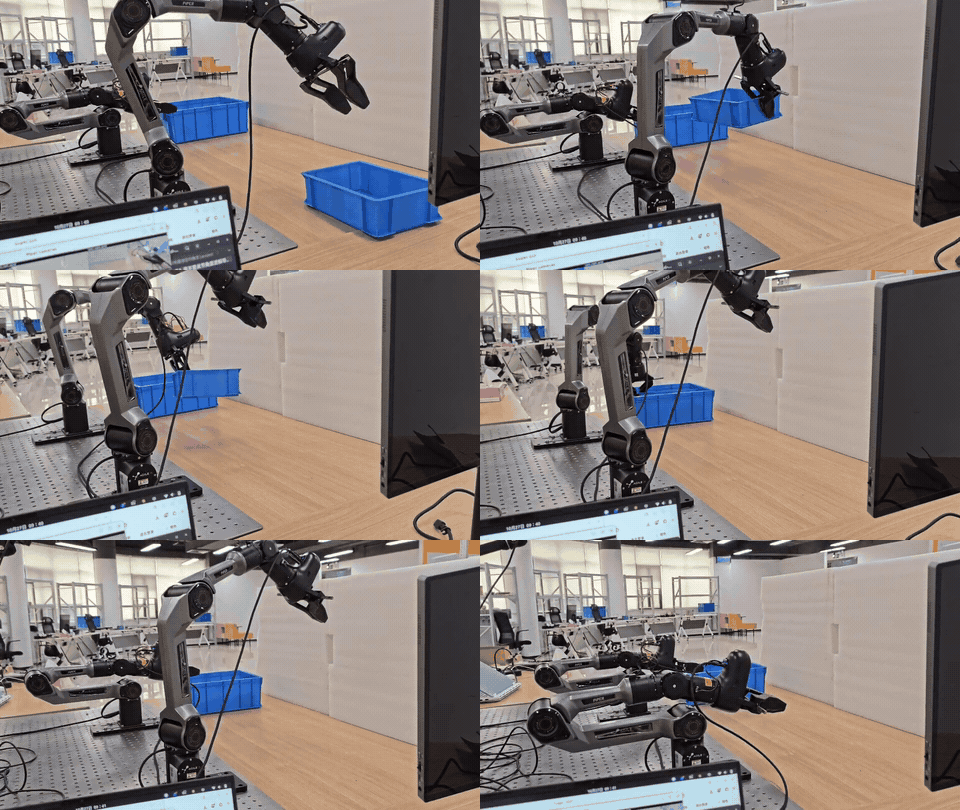
🎬 Real-robot pick-and-place: "Pick up the small blue container and place it inside the large one." (4× speed) · Watch original speed →
📑 Table of Contents
- [Overview](#overview) - [Highlights](#highlights) - [System Overview](#system-overview) - [Hardware Setup](#hardware-setup) - [Installation](#installation) - [Data Collection](#data-collection) - [Dataset Pipeline](#dataset-pipeline) - [VLA Training](#vla-training) - [Real-Robot Deployment](#real-robot-deployment) - [Released Models and Datasets](#released-models-and-datasets) - [Dashboard](#dashboard) - [Project Layout](#project-layout) - [Documentation](#documentation) - [Testing](#testing) - [License](#license) - [Acknowledgements](#acknowledgements)Overview
bimanual-vla connects the complete real-robot learning loop in one repository:
collect synchronized Piper demonstrations, validate and export LeRobot datasets,
manage datasets and checkpoints across workstations and GPU clusters, fine-tune
OpenPI pi0 / pi0.5 policies, and deploy action chunks through a latency-aware
execution stack with local safety checks.
Piper + RGB Cameras  ->  Robot Demonstrations  ->  LeRobot Dataset
        ->  OpenPI Fine-tuning  ->  Policy Server
        ->  Real-Time Chunking  ->  Safety Layer  ->  Piper Execution
Training workflows cover supervised fine-tuning (SFT) with OpenPI and
reinforcement learning (RL) through the simulation Dashboard’s RLinf
integration, with shared experiment, checkpoint, and evaluation-video management.
The workflow supports single-arm and bimanual Piper operation, joint-space and
end-effector (delivery) data contracts, and GUI/CLI workflows.
📌 v1.0.0 — First Stable Release
The first stable release supports **joint-angle and end-effector pose control**, **Quest VR and master/slave-arm teleoperation**, **human takeover during policy execution**, and **RECAP recording, export, and offline training integration**. Joint-angle and end-effector pose policy execution have completed real-robot testing. The previously observed policy-execution jitter has been resolved in the tested configuration, as confirmed by the robot operator on November 6, 2026. | Capability | v1.0.0 support | |---|---| | Robot control | Joint-angle targets and end-effector pose targets, for single-arm and bimanual Piper workflows | | Teleoperation | Master/slave arms and Quest VR controllers | | Human intervention | Policy takeover/resume, multiple clutch segments, and GUI/controller status synchronization | | RECAP data | Policy and human segments, success/failure labels, segment-aware export, and timestamp validation | | RECAP training | RLinf returns, value learning, and advantage labels with the existing OpenPI/JAX policy adapter | See the [v1.0.0 release notes](/bimanual-vla/docs/releases/v1.0.0.html) for validation scope and known issues, including initialization after hardware zero recalibration.Highlights
- End-to-end real-robot pipeline from demonstrations to closed-loop policy execution.
- Multi-camera Piper collection with GUI operation, teleoperation, replay, and episode management.
- Quest VR teleoperation over ADB, with live controller diagnostics, clutch-based hand control, saved-home reset, and guarded Piper commands.
- Joint-angle and end-effector pose control, with real-robot-tested policy execution and resolved deployment jitter in the validated configuration.
- VR RECAP interventions that hand control between the policy and Quest without a second CAN writer, record intervention metadata, and export valid policy and human segments.
- LeRobot-compatible data with versioned contracts, validation, conversion, and upload tools.
- Multi-node Dashboard for dataset locations and transfers, checkpoint synchronization, training jobs, metrics, and evaluation videos.
- SFT and RL workflows: OpenPI supervised fine-tuning with configurable full/LoRA tuning and π0.5 RTC training; RLinf integration for simulation RL training and evaluation.
- Real-time, safety-aware deployment with model-side RTC, asynchronous inference, an independent Ruckig command loop, and local execution checks.
System Overview
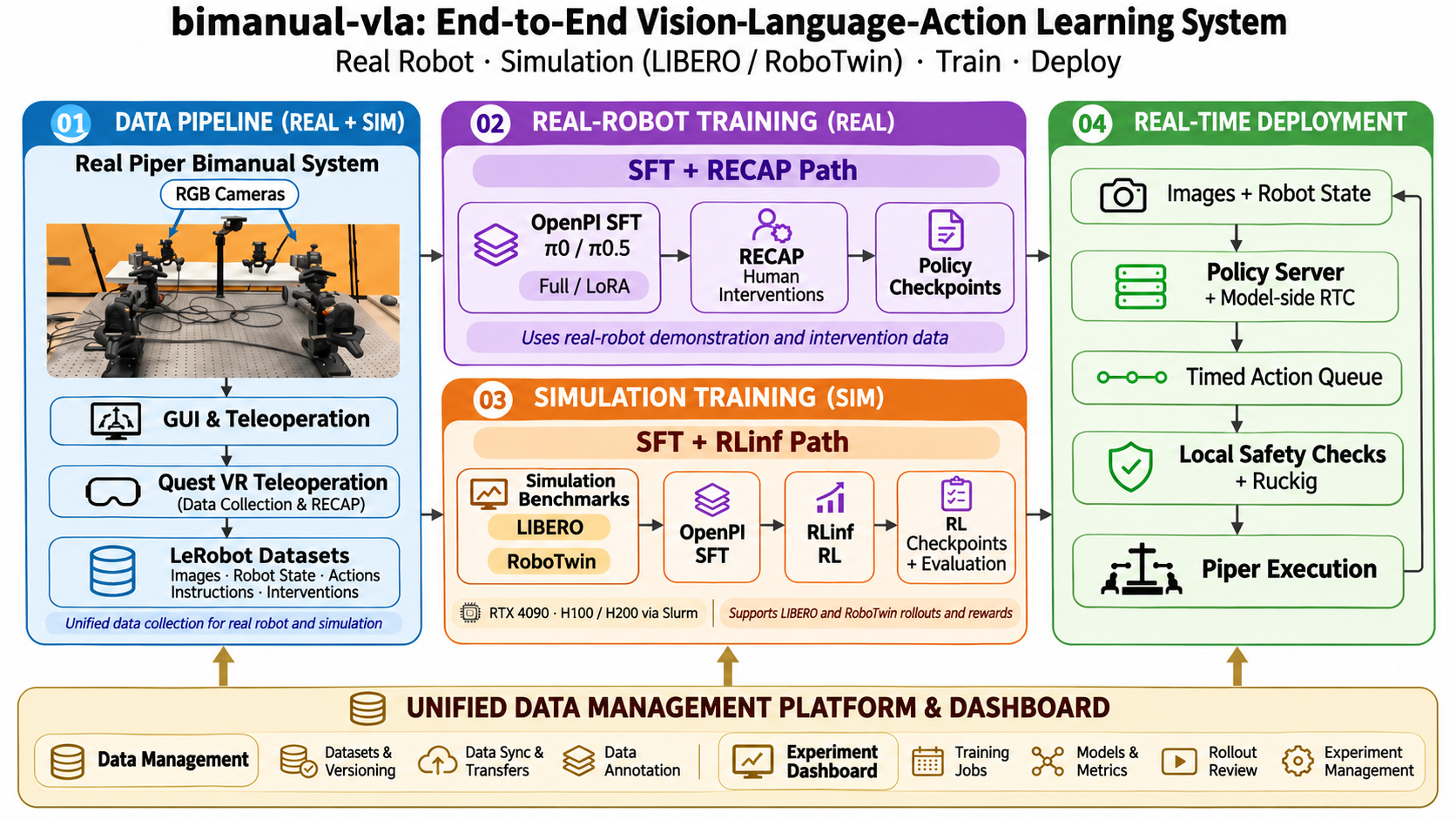
The public workflow is organized into three stages:
| Stage | Input | Core Components | Output |
|---|---|---|---|
| Data Collection | Piper feedback, RGB views, language instruction | GUI or teleoperation, synchronized recording, episode validation | Raw robot episodes and LeRobot v2.1 datasets |
| VLA Training | Demonstrations for SFT; simulation rollouts/rewards for RL | OpenPI SFT, RLinf RL profiles, local/Slurm job management | Checkpoints, metrics, and evaluation artifacts |
| Deployment | Live observation and Policy checkpoint | Asynchronous WebSocket inference, model-side RTC, action queues, safety gates | Validated Piper commands at the configured control rate |
Hardware Setup
Robot and Sensors
| Component | Configuration |
|---|---|
| Robot | Piper robotic arm, single-arm or bimanual |
| Kinematics | 6 revolute joints per arm plus gripper |
| End effector | Piper gripper, approximately 0.00-0.07 m opening range |
| Control | Piper SDK over SocketCAN at 1 Mbit/s |
| Overhead camera | Intel RealSense D435i, third-person RGB view |
| Wrist cameras | Intel RealSense D405, one RGB view per active wrist |
| Collection rate | Configurable; GUI defaults to 30 FPS, teleoperation CLI to 20 FPS |
| Policy / command rate | Default 20 Hz reference updates and 100 Hz Ruckig command publication |
Compute
| Role | Typical Platform | Responsibility |
|---|---|---|
| Robot workstation | Ubuntu 22.04, x86_64 | CAN control, camera capture, GUI, RTC client |
| Policy & Dashboard server | NVIDIA RTX 4090 workstation | Multi-node data management, Policy inference, telemetry |
| Training cluster | NVIDIA H100 / H200 with Slurm | Multi-GPU fine-tuning and evaluation |
ROS, ROS2, gRPC, and EtherCAT are not required by the current stack.
Installation
git clone https://github.com/SUNNYsyy2005/bimanual-vla.git
cd bimanual-vla

conda create -n dual_arm python=3.10.20 -y
conda activate dual_arm
python -m pip install --upgrade pip setuptools wheel
python -m pip install -r requirements.txt

bin/bimanual-vla --help
System packages, SocketCAN activation, RealSense selection, OpenPI setup, Dashboard configuration, Slurm, verification, and troubleshooting are covered in the complete installation guide.
Data Collection
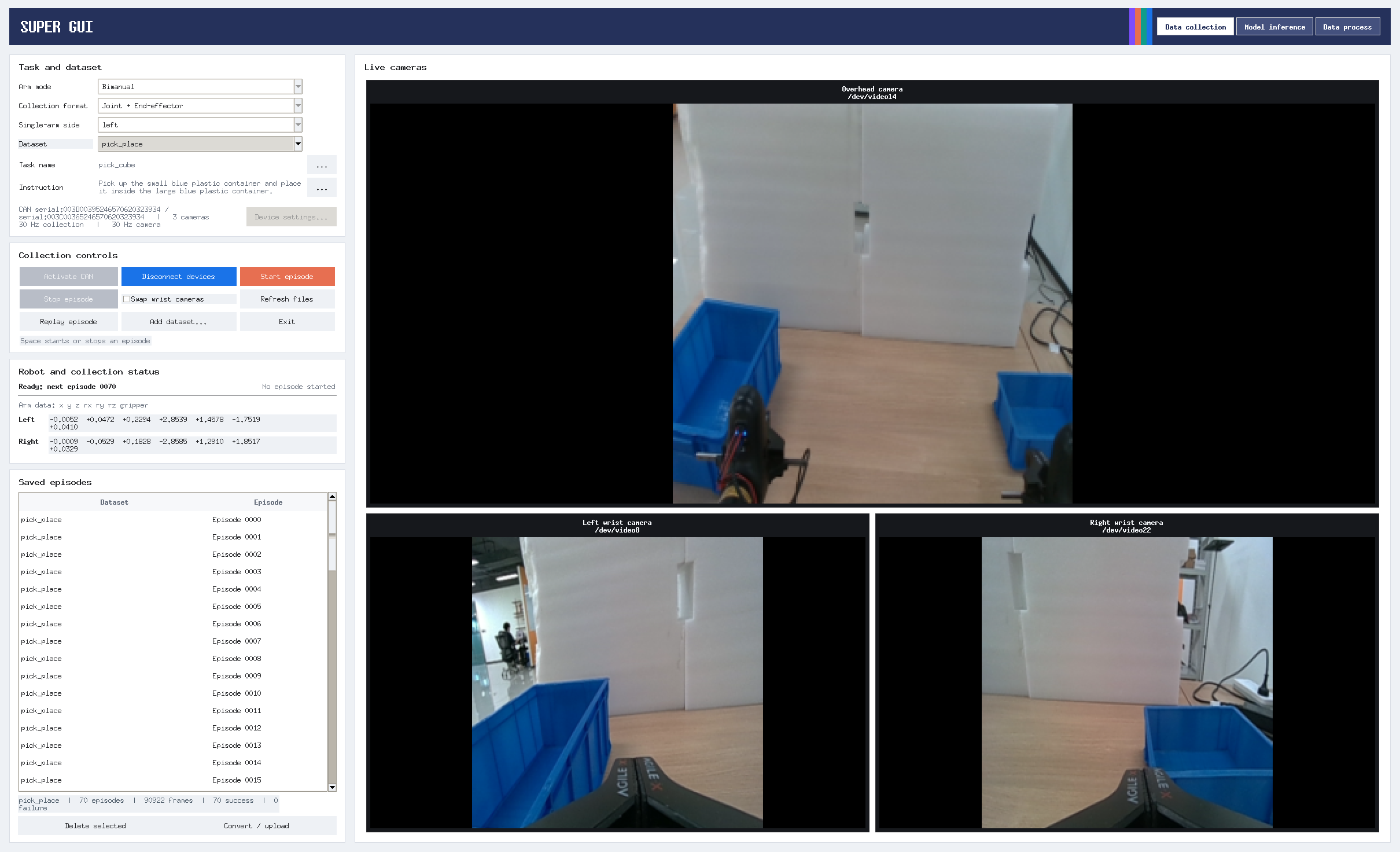
The collection application provides device discovery, live multi-camera preview, task metadata, robot feedback, episode controls, replay, and direct conversion/upload. It supports single-arm and bimanual collection, master/slave teleoperation, Quest VR control, overhead plus wrist RGB streams, and success/failure labeling.
# Launch the GUI
conda activate dual_arm
bash start_gui.sh

# Or use CLI for bimanual teleoperation
bin/bimanual-vla teleop-bimanual --record --schema joint
See the GUI operation guide and data collection guide before connecting hardware.
🎮 Quest VR Teleoperation
Quest teleoperation uses the official Quest APK, ADB, the Quest project IK solver, and the existing Piper `JointCtrl` connection. It does not require ROS or a second robot-control process. Install the APK, enable Quest Developer Mode and USB debugging, connect the headset by USB, and verify that `adb devices` shows an authorized device. In the collection GUI, choose `quest_vr` as the control source, select the ADB serial, and connect the robot devices. Hold left `Y` or right `B` to engage an arm; release the clutch to hold the current pose and press again to re-anchor. The trigger controls gripper opening (`1 - trigger`). The GUI's VR input panel shows tracking, button, and trigger values. See the [Quest collection guide](/bimanual-vla/docs/QUEST_COLLECTION.html) for the complete setup and safety requirements.🕹️ VR RECAP Policy Interventions
RECAP is enabled in the Model inference page with **Record human takeovers**. The policy must use the canonical v3 `delivery` contract with local IK and the Ruckig execution backend. After the policy has connected and published its first command, control can be switched: - Click **Take over** in the RECAP panel, or press left-hand `X` once; - Control the robot with the normal `Y`/`B` clutches and trigger; - Click **Resume policy**, or release and press left-hand `X` once again. After stopping inference, choose **Success**, **Failure**, or **Abort** before starting the next run. Raw deployment recordings retain the full timeline for audit. `recap-export` removes invalid handoff/hold intervals from the trainable episode while preserving segment boundaries: ```bash bin/bimanual-vla recap-export \ deployment_runs/RUN_SUCCESS deployment_runs/RUN_FAILURE \ --output datasets/recap_round_01 --fps 30 ``` See the [RECAP guide](/bimanual-vla/docs/RECAP.html) for export, upload, RLinf value/advantage stages, and the required safety and labeling rules.🔄 Episode Preview and Hardware Replay
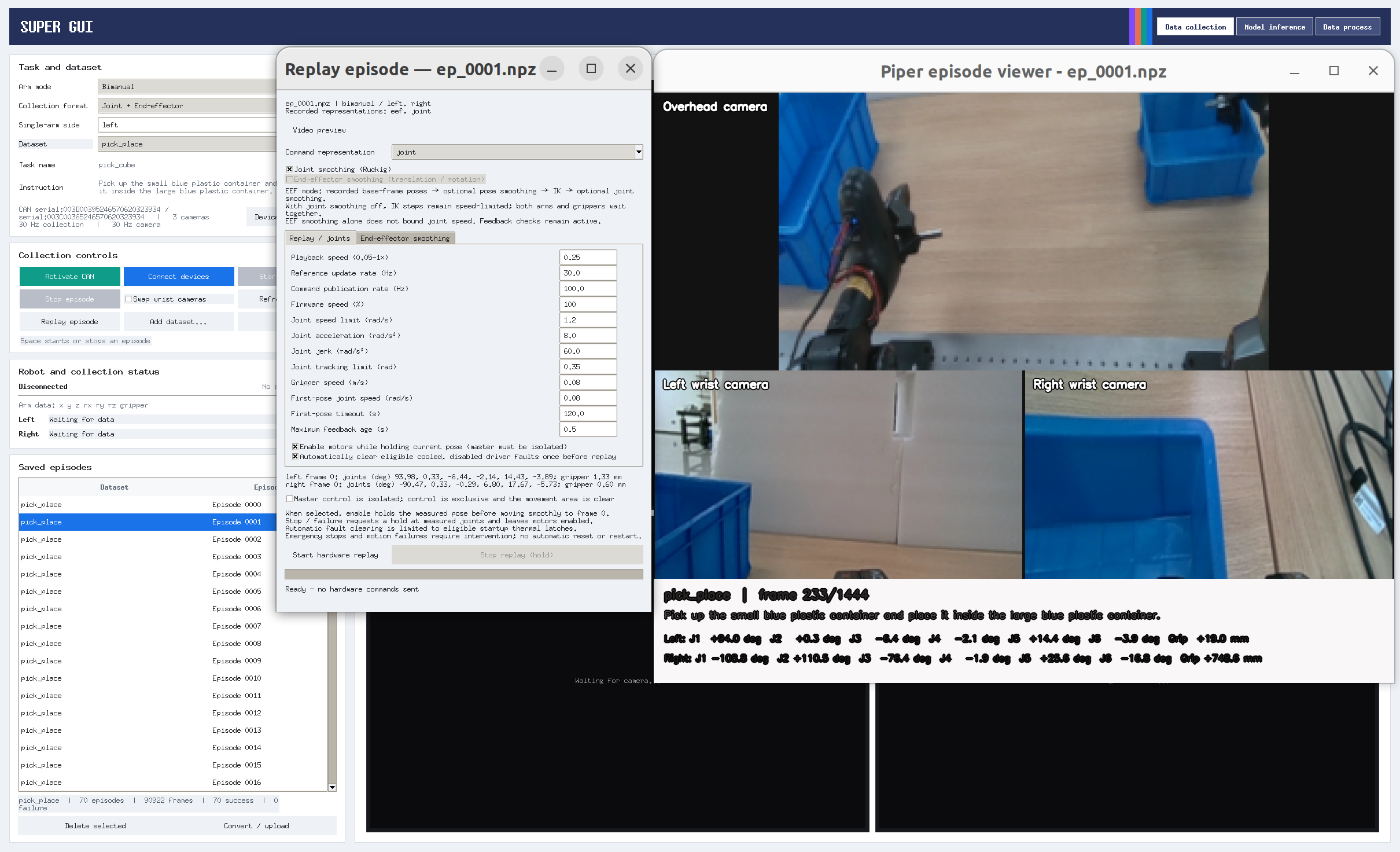
Dataset Pipeline
Raw NPZ Episodes  ->  Contract Validation  ->  LeRobot v2.1
       ->  Dataset Inspection / Merge  ->  OpenPI Training Dataset
Each episode combines RGB observations, robot state, actions, language instructions, and metadata. Supported v3 action contracts:
| Mode | Schema | Observation | Raw Action | Model Action |
|---|---|---|---|---|
| Single arm | Joint | 7D | 7D | 7D |
| Bimanual | Joint | 14D | 14D | 14D |
| Single arm | Delivery | 10D | 10D | 7D |
| Bimanual | Delivery | 20D | 20D | 14D |
# Validate raw episodes
bin/bimanual-vla data-validate --input-dir episodes_piper_v21 --target-fps 20

# Export to LeRobot v2.1
bin/bimanual-vla data-export \
  --input-dir episodes_piper_v21 \
  --repo-id piper/piper_v1 \
  --root lerobot_datasets/piper_v1 --fps 20

# Validate the exported dataset
bin/bimanual-vla data-check lerobot_datasets/piper_v1
The authoritative field definitions are documented in the Piper data contract.
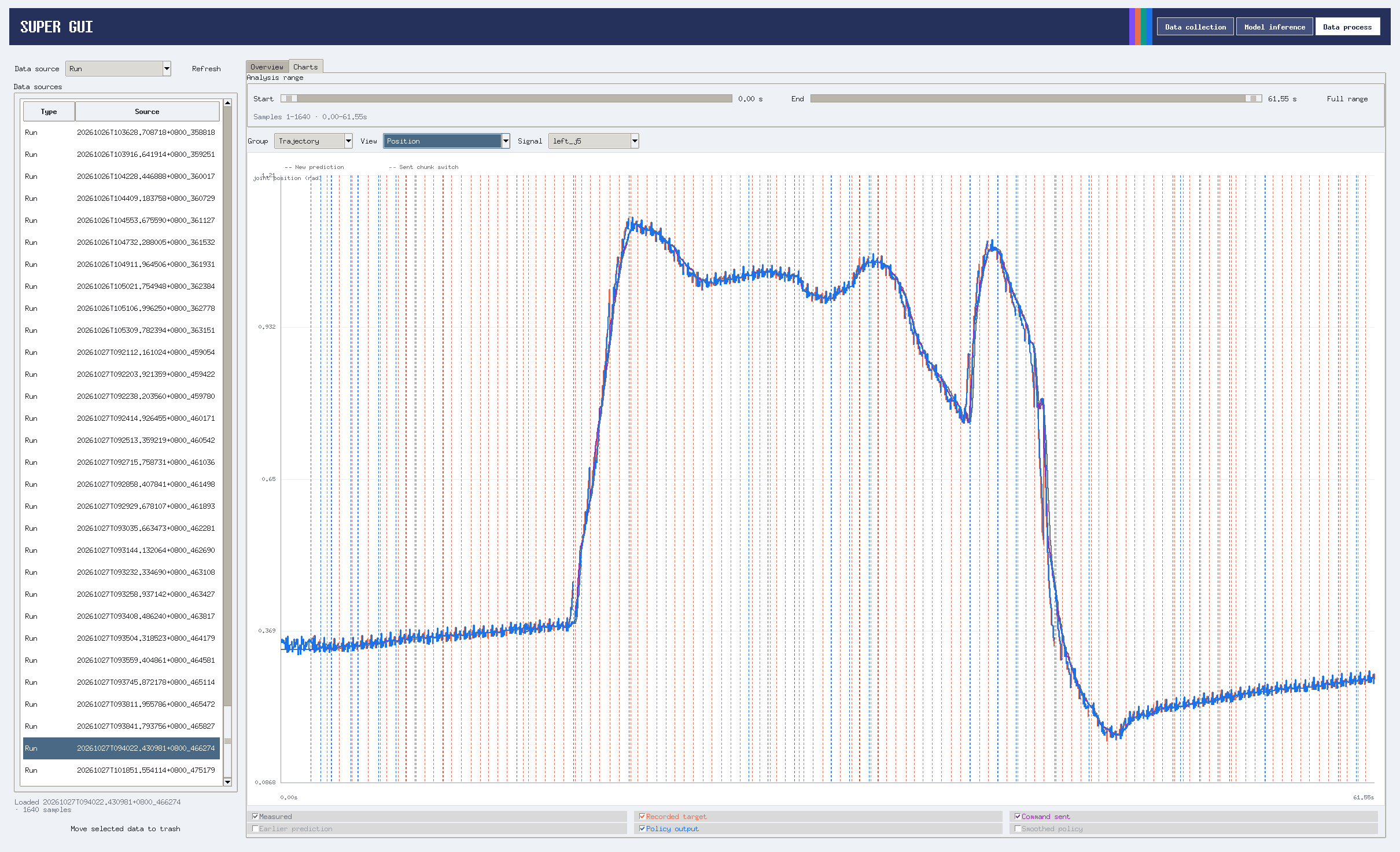
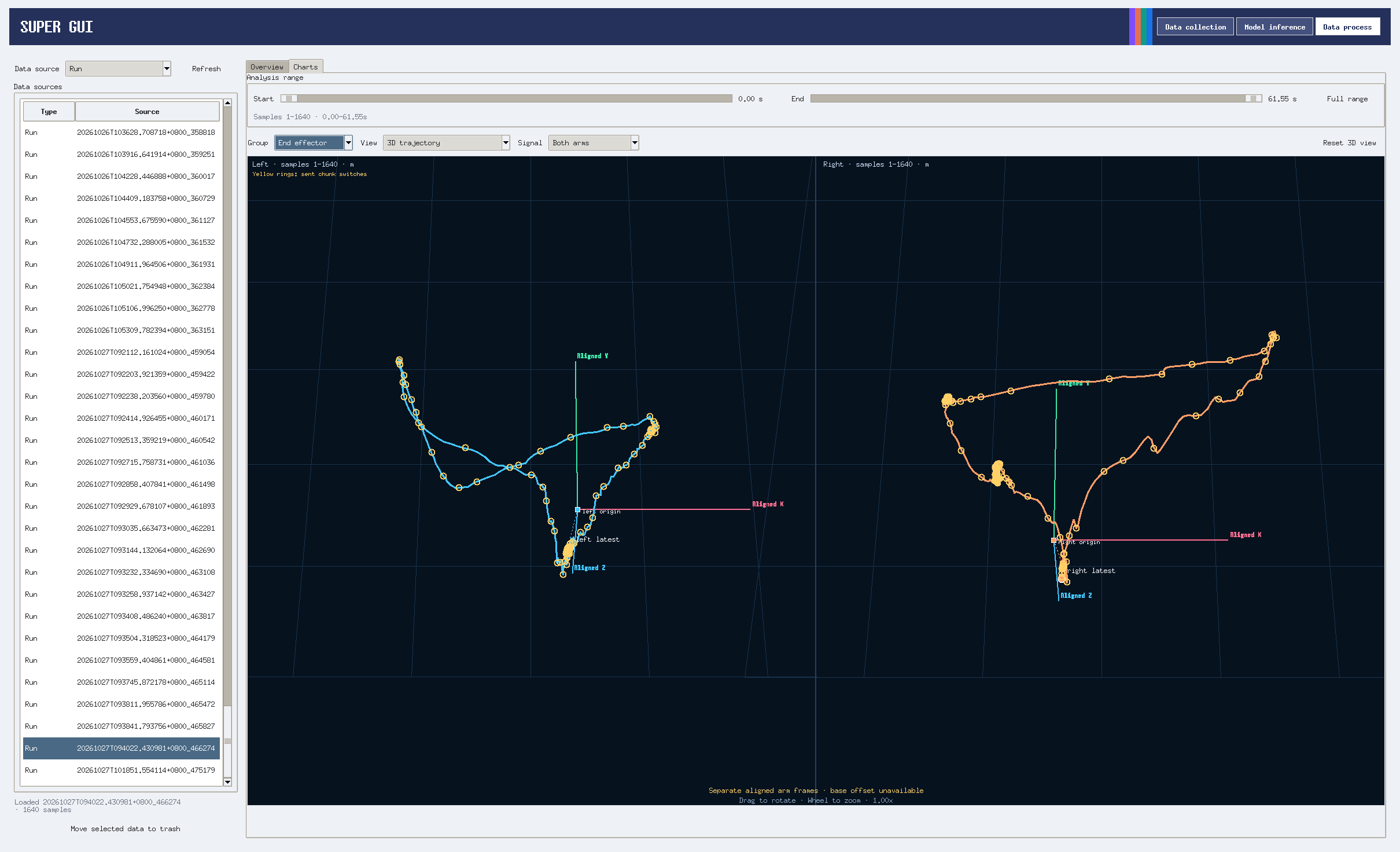
📊 Client-side Trajectory and End-Effector Analysis
VLA Training
The platform supports two training modes:
| Mode | Backend | Workflow |
|---|---|---|
| SFT | OpenPI pi0 / pi0.5 + LeRobot demonstrations |
Normalization, train/test splits, configurable fine-tuning, FSDP, checkpointing, held-out evaluation |
| RL | RLinf + simulation environments | Launch profiles, rollout/training metrics, checkpoint management, evaluation videos |
Input:
  Images: overhead RGB + wrist RGB views
  State: joint 7D/14D or end-effector 10D/20D
  Language: natural-language task instruction

Output:
  Action chunk: 50 x 7D or 50 x 14D
  Execution target: schema-dependent decoded action with safety checks
For SFT, the backend integrates OpenPI pi0 and pi0.5 with independently
configurable action-expert, language-model, and vision-encoder tuning. The
π0.5 path also supports training-time RTC prefix conditioning. FSDP can
distribute supported runs across multiple GPUs; H100/H200 jobs are submitted
through Slurm.
Download an OpenPI base checkpoint:
python -m scripts.models.download_openpi_checkpoint \
  --checkpoint gs://openpi-assets/checkpoints/pi05_base \
  --source auto --workers 16 --chunks-per-file 16
Note: Training and Policy serving use a separate OpenPI Python 3.11 environment. Follow the installation guide for the pinned upstream revision and server configuration.
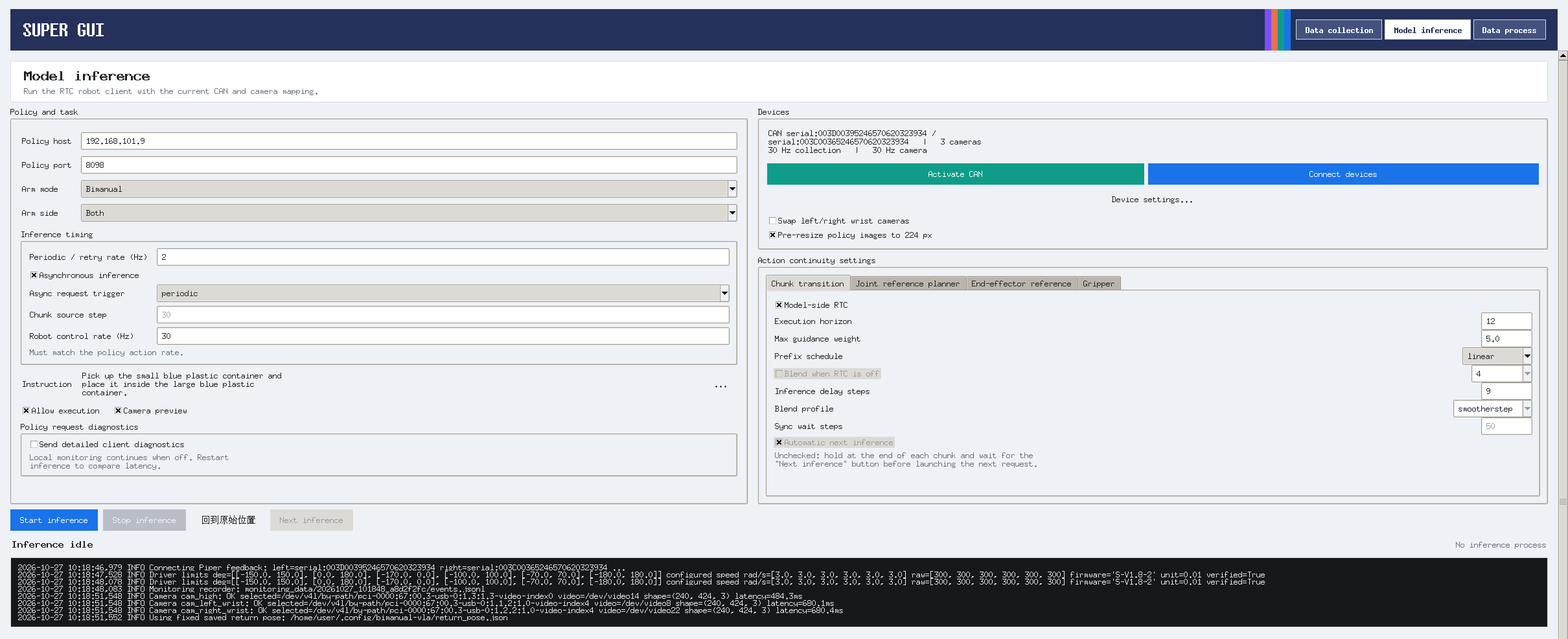
Real-Robot Deployment
Robot Workstation                         Policy Server
-----------------                        -----------------
RGB cameras + Piper state  --WebSocket->  OpenPI pi0 / pi0.5
RTC session and timing      --WebSocket->  Model-side RTC
Action queue + safety       <-WebSocket-- Timestamped action chunk
        |
        +-->  Reference updates --> Ruckig --> Validated Piper commands
Start the Dashboard/Policy stack on a configured inference server, then run the robot client in shadow mode first:
export BIMANUAL_VLA_POLICY_HOST="<policy-server-host>"

bin/bimanual-vla rtc-client \
  --host "$BIMANUAL_VLA_POLICY_HOST" \
  --port 8000 \
  --arm-mode bimanual \
  --arm-side both \
  --left-can serial:LEFT_CAN_SERIAL \
  --right-can serial:RIGHT_CAN_SERIAL \
  --cam-high-device serial:OVERHEAD_CAMERA_SERIAL \
  --cam-left-wrist-device serial:LEFT_WRIST_CAMERA_SERIAL \
  --cam-right-wrist-device serial:RIGHT_WRIST_CAMERA_SERIAL \
  --instruction "pick up the cube" \
  --hz 4 \
  --control-hz 20 \
  --rtc-enabled
[!CAUTION] Real motion requires the local
--allow-executionflag and valid robot, observation, and Policy state. Stale inputs, a contract mismatch, or a failed safety check block execution or trigger the configured hold/braking behavior.
⚙️ Inference Timing and Execution Controls
Policy inference, model action timing, reference updates, and actuator command publication have separate clocks. Reference updates default to `--control-hz 20`; the Ruckig backend publishes at `--servo-hz 100` by default. Model action timing comes from Policy metadata (30 Hz for the released pick-and-place checkpoints) unless explicitly overridden with `--action-hz`. The client supports two inference scheduling modes: - `--inference-trigger-mode periodic` (default): attempt a new inference at `--hz` (default 4 Hz), with at most one request in flight. - `--inference-trigger-mode chunk_step --inference-trigger-step 10`: launch the next request when the accepted chunk reaches the specified source step. The execution path includes configurable joint trajectory shaping and safety interlocks: - `--trajectory-shaping` selects the **Ruckig** reference planner by default, with velocity, acceleration, jerk, tracking-error, and joint-position limits. Use `--servo-backend legacy` for the older low-pass/tracking pipeline or `--no-trajectory-shaping` for controlled comparisons. - `--pose-trajectory` optionally shapes EEF pose references before IK and is disabled by default. It requires the Ruckig backend. - `--blend-profile smootherstep` controls the optional action-boundary blend. - `--gripper-open-lookahead-steps` can anticipate opening while keeping gripper filtering and safety checks active. - `--reject-external-control-streams` guards against simultaneous high-rate Piper control; `--auto-return` is enabled by default for a monitored return to the startup pose on normal shutdown. **Important:** smoothing and motion limits trade tracking responsiveness for command continuity. Aggressive filtering or lookahead can cause lag or overshoot; disabling shaping can expose high-frequency joint jitter. Validate settings in shadow mode and then in a supervised, low-risk hardware test before normal deployment. See the [RTC deployment guide](/bimanual-vla/docs/deployment/RTC_CLIENT_GUIDE.html) for parameters, diagnostic definitions, and safety prerequisites.Released Models and Datasets
The 20,000-step π0.5 checkpoints and their matching real-robot datasets are available on Hugging Face in both joint-space and end-effector-space formats:
| Representation | Dataset | Model Weights |
|---|---|---|
| Joint space — 14D | pick_place_clean_joint_20261025 | π0.5 joint · 20k |
End-effector (delivery) — 20D |
pick_place_clean_delivery_20261025 | π0.5 EEF · 20k |
Each dataset contains 90 episodes / 69,905 frames at 30 FPS, with overhead and left/right wrist RGB views in LeRobot v2.1 format (81 training / 9 held-out). Both policies use full vision-encoder and action-expert fine-tuning, language-model LoRA, and RTC training with delays up to 12 steps.
Dashboard
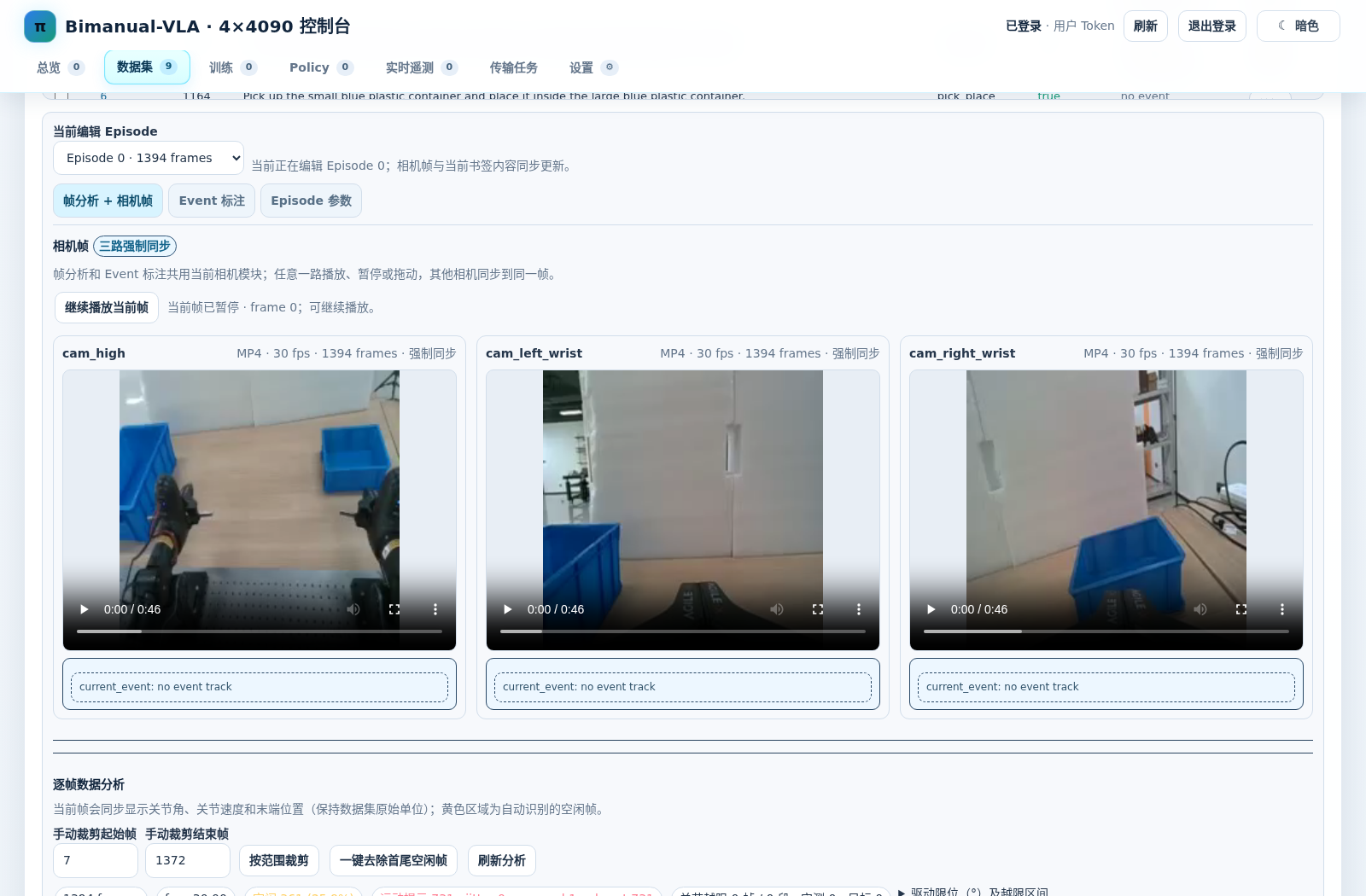
The Dashboard is the project’s data and experiment management platform. Collection workstations upload demonstrations through the GUI, CLI, or REST API; the web interface tracks their locations and moves the required datasets and checkpoints between local storage, inference workstations, and configured H100/H200 Slurm targets.
📋 Dashboard Capabilities
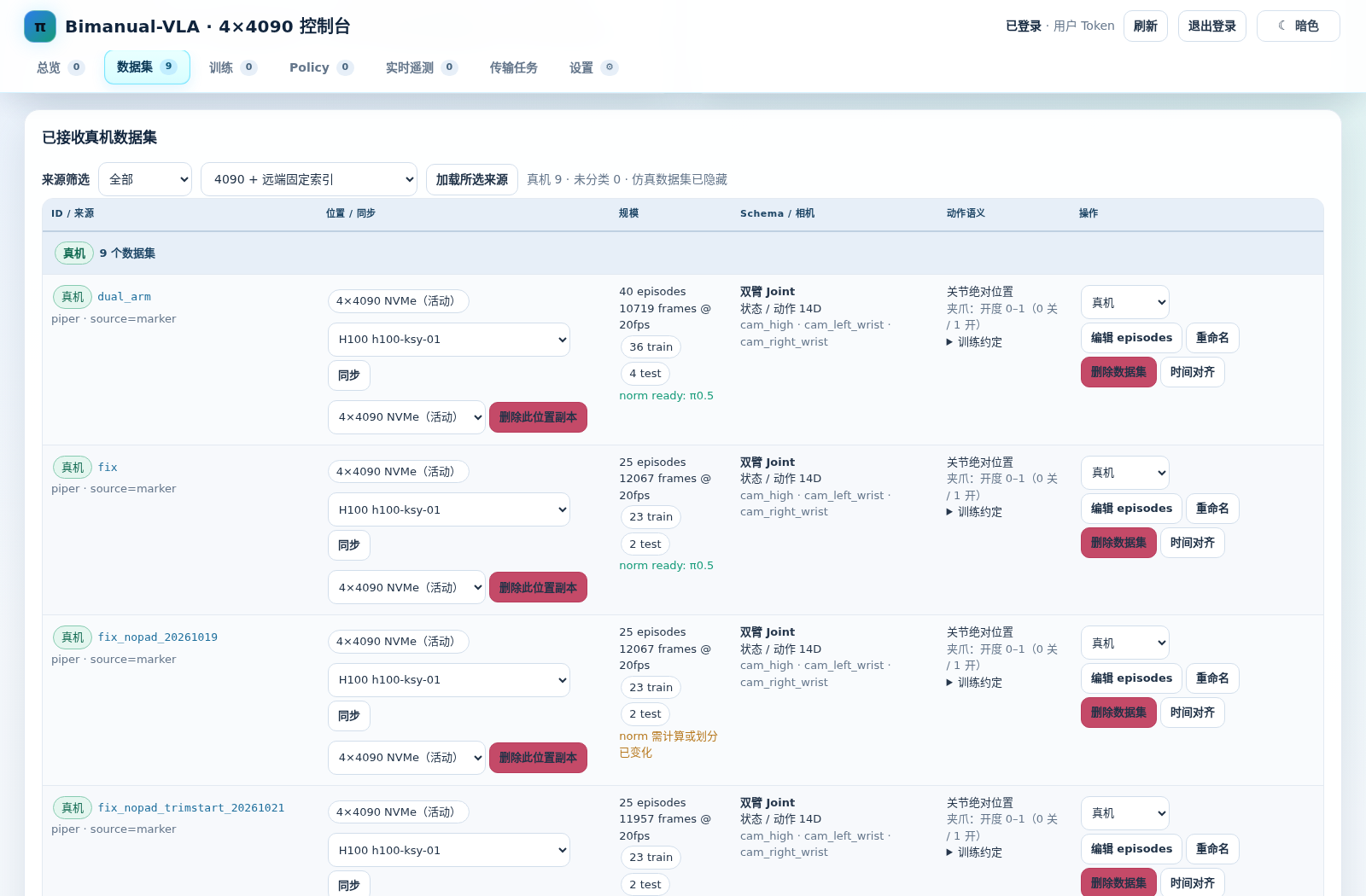
| Capability | Workflow | |---|---| | Multi-node data catalog | Group dataset copies by ID, inspect per-node locations and counts, filter real/simulation sources, and synchronize datasets to a training target | | Dataset preparation | Resumable uploads, episode and camera previews, metadata editing, merge/trim tools, time-alignment inspection, and persistent train/test splits | | SFT and RL training | Manage OpenPI SFT and configured RLinf simulation RL runs, submit jobs, inspect GPU resources, and follow task logs, loss/reward curves, and evaluation metrics | | Checkpoint management | Browse local and remote checkpoints, retain action contracts and normalization assets, and synchronize trained weights to the inference server | | Deployment and review | Manage Policy processes, inspect live telemetry and trajectories, and browse/synchronize simulation evaluation videos | | Storage and node settings | Configure data/checkpoint roots and extension nodes for the available workstation and cluster infrastructure | Real-robot and simulation Dashboards use separate service configurations and source filters while sharing the underlying management code. The platform exposes the same operations through an authenticated [REST API](/bimanual-vla/server_4090/API_USAGE.html) for scripted workflows.📂 Multi-node Dataset Catalog
See Dashboard operations and the simulation workflow guide.
Project Layout
.
|-- assets/                    # README images and demos
|-- bin/bimanual-vla          # Unified command entry point
|-- bimanual_vla/
|   |-- collection/           # GUI, cameras, teleoperation, robot sessions
|   |-- data/                 # Contracts, validation, export, upload, analysis
|   |-- deployment/           # RTC client, Ruckig, Policy adapters, safety
|   `-- training/             # OpenPI model, fine-tuning settings, RTC sampling
|-- server_4090/              # Dashboard backend, frontend, Policy services
|-- docs/                     # Installation, collection, and deployment guides
|-- scripts/                  # Model, maintenance, analysis, and smoke tools
|-- jobs/                     # Slurm and analysis jobs
|-- tests/                    # Automated test suite
`-- requirements.txt          # Robot workstation dependencies
Documentation
| Topic | Guide |
|---|---|
| Installation and hardware | Installation |
| Collection GUI | GUI operation guide |
| Data collection | Data collection guide |
| Dataset fields and semantics | Piper data contract |
| 7D/10D action design | OpenPI action design |
| Real-robot inference | RTC client guide |
| RLSOK device review | RLSOK integration guide |
| Dashboard backend | Dashboard operations |
| Dashboard API | API reference |
| Simulation workflows | Simulation Dashboard |
Testing
python -m unittest discover -s tests -v
Hardware and Policy smoke tests are available under scripts/smoke/. Run them
only in the matching robot or inference-server environment.
License
The original source code and documentation in this repository are available under the Apache License 2.0, except where otherwise indicated.
- Commercial use, modification and redistribution are permitted, subject to the terms of the license, including required attribution and preservation of relevant license and notice files.
- This repository incorporates or adapts work from other projects. See NOTICE and any third-party license notices.
- Model checkpoints and datasets hosted outside this repository are subject to their respective model and dataset cards and licenses.
Acknowledgements
This project builds on OpenPI, LeRobot, and the Piper robot SDK.